COD aimbot
An aimbot moves your aim onto a target while you hold its key. Which player it picks, where on them it aims and how quickly it gets there are all settings, and those settings decide whether it helps or gets in your way.
How it picks a target
A simple aimbot takes whoever is nearest your crosshair. CC ThreatSense weighs more than that: how visible each player is, how far away they are and how much of a threat they are. A player in the open at close range comes before one half-hidden at the edge of the screen.
Two limits sit on top of the ranking. The visibility check leaves out players you cannot see, and maximum distance stops it reaching for anyone beyond the range you set.
Where it aims
Precision bone selection fixes the exact point on a player it aims for. Nearest bone chooses for you instead, taking whichever part of the player is closest, which is what you want when only a shoulder or a leg shows past cover.
How far it reaches
The aimbot only considers players inside a circle around your crosshair: its field of view, or FOV. You set the size of the circle. Dynamic FOV adjusts the targeting on top of the size you choose.
How it moves
Smart smoothing controls the pull: heavy smoothing drags your aim across slowly and steadily, light smoothing gets it there fast. Humanised aim softens the switch from one target to the next. Advanced prediction leads a player who is moving, and close-range assist is tuned for fights within a few metres.
Keys and profiles
It works while you hold an aim key, and you can set a primary and a secondary one. Every setting above is saved in a profile, so one game mode can have a long-range setup and another a close-range one, with a hotkey to switch.
Every aimbot feature
What each one does. A note marks any feature that is not in every build.
- CC ThreatSense
- Prioritises targets by visibility, distance and threat level.
- Custom aim keybinds
- Set a primary and a secondary aim key.
- Precision bone selection
- Choose the body part the aimbot targets, such as the head or chest.
- Nearest bone
- Aims at whichever bone is closest to your crosshair at that moment.
- Dynamic FOV
- The aim area adjusts to the fight instead of staying one fixed size.
- FOV customisation
- Set how wide an area around your crosshair the aimbot considers.
- Smart smoothing
- Controls how quickly aim moves onto a target, from snappy to gradual.
- Humanised aim
- Smoother, more natural transitions between targets.
- Advanced prediction
- Accounts for target movement.
- Close-range assist
- Adds extra help when an enemy is right on top of you.
- Visibility check
- Prioritises targets you can see.
- Maximum distance
- Ignore targets beyond a distance you choose.
Aimbot in game
The settings as they appear in the CODCheats in-game menu.
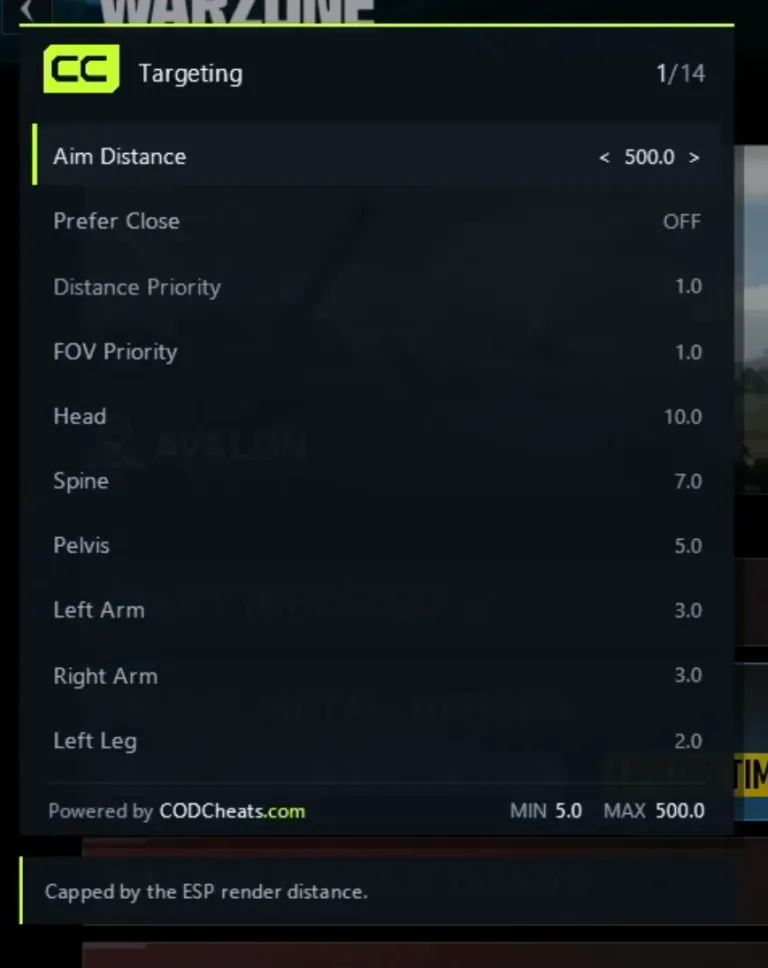
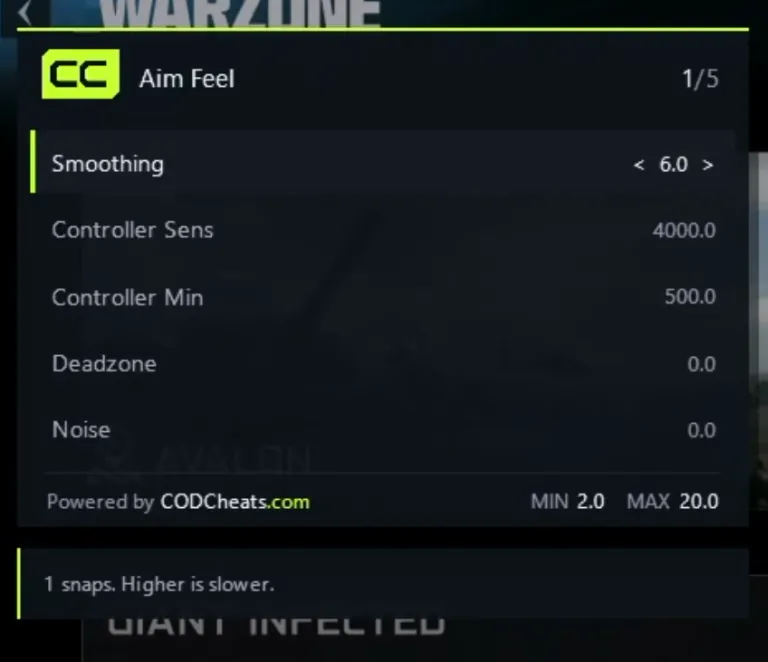
Captured in Warzone. The menu is the same in every build.
Aimbot by game
Each build’s aimbot, with its status today.
- Status: Updating
All 12 aimbot features
Battle Royale fights often start at long range, so maximum distance and advanced prediction do more work here. Resurgence is closer, which is why the build keeps a profile for each.
Warzone cheats: features, plans and requirements - Status: Updating
All 12 aimbot features
Black Ops 7 multiplayer is fought close up on small maps, which is what close-range assist and smart smoothing are set up for. Zombies can have a profile of its own.
Black Ops 7 cheats: features, plans and requirements - Status: Updating
All 12 aimbot features
The full aimbot group ships with the build on launch day, 23 October 2026.
Modern Warfare 4 cheats: features, plans and requirements



Aimbot questions
Is an aimbot the same as aim assist?
No. Aim assist is part of the game itself: it slows or nudges your aim near a target when you play with a controller. An aimbot is third-party software that moves your aim onto a target for you, and using it breaks the game’s terms of service.
What is CC ThreatSense?
The aimbot’s target priority. Instead of taking the nearest player, it ranks the players in its FOV by how visible they are, how close they are and how much of a threat they pose, and aims for the first. It is in every build that has the aimbot.
Can my Call of Duty account be banned?
Yes. Third-party software breaks Activision’s terms of service, and any account that uses it can be suspended or banned. No provider can promise otherwise, and we will not. Only use an account you are prepared to lose.
Guides
- Warzone settings: a Battle Royale profile and a Resurgence profile
- Aimbot or triggerbot: what each one does
Other features
- Triggerbot When the triggerbot fires, what it fires at and why it works on a hold key.
- ESP What ESP shows through walls, what its filters change and which games have it.
- Radar The 3D radar’s labels, the 2D radar’s overhead view and how to fit both to your screen.
Pick your game
One plan covers every build. Each game page has its full feature list, status and requirements.